





Spring MVC 요청(Request) 처리
@RequestMapping, HTTP 메서드 매핑, PathVariable, 요청 파라미터 처리 방법
Carefreelife98
3분 소요
@RequestMapping 다중 설정
1@RequestMapping({"/carefree/v1", "/carefree/v3"})- @RequestMapping() 은 대부분의 속성을 배열[]로 제공한다
- 따라서 중괄호 안에 , 로 분리된 서로 다른 여러 URL을 지정할 수 있다
- 그 결과로 서로 다른 URL에 요청이 오더라도 같은 메소드를 실행하여 같은 값을 반환할 수 있다
HTTP 메서드
@RequestMapping에method속성으로 HTTP 메서드를 지정하여 각 HTTP 요청을 분류하여 호출 여부를 정할 수 있다- method 속성의 지정이 없을 경우 모든 HTTP 요청을 허용, 메서드 호출
1@RequestMapping(value = "/carefree", method = RequestMethod.GET)2// 'method = ' 에 특정된 HTTP 메서드 요청만 허용하여 호출됨3// GET, HEAD, POST, PUT, PATCH, DELETE 메서드가 있다- 만약 특정된 메서드 외의 요청을 하면 MVC는 HTTP 405 (Method Not Allowed)를 반환한다
HTTP 메서드 매핑 간편하게 사용하기
HTTP 메서드를 축약한 애노테이션:
@GetMapping@PostMapping@PutMapping@DeleteMapping@PatchMapping
1@GetMapping(value = "/carefree-v2")2public String mappingGetV2() {3 log.info("carefree-v2");4 return "ok";5}
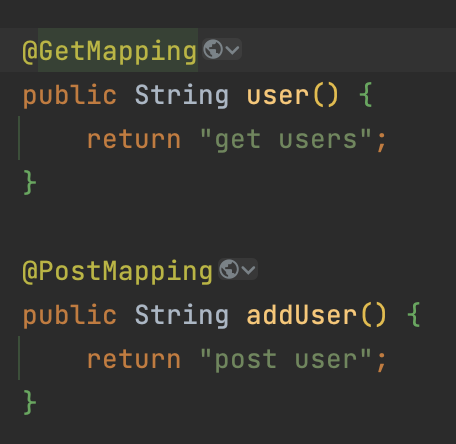
같은 URL을 지정 하더라도 HTTP 축약 애노테이션의 종류에 따라 다른 메서드를 호출 할 수 있다.
PathVariable(경로 변수)
최근 HTTP API는 다음과 같이 리소스 경로에 식별자를 넣는 스타일을 선호한다:
- /carefree/user1
- /members/2
@RequestMapping은 @PathVariable(경로 변수)를 사용하여 URL 경로를 템플릿화 할 수 있다.
1@GetMapping("/carefree/{userId}")2public String mappingPath(@PathVariable("userId") String data) {3 log.info("mappingPath userId={}", data);4 return "ok";5}만약 @PathVariable의 이름과 파라미터의 이름이 같으면 생략이 가능하다:
1// 생략 전2public String mappingPath(@PathVariable("userId") String userId)3// 생략 후4public String mappingPath(@PathVariable String userId)@PathVariable 다중 사용
1@GetMapping("/carefree/users/{userId}/orders/{orderId}")2public String mappingPath(3 @PathVariable String userId,4 @PathVariable Long orderId) {5 log.info("mappingPath userId={}, orderId={}", userId, orderId);6 return "ok";7}특정 헤더 조건 매핑
HTTP 요청에 특정 헤더가 포함되어있는 경우 실행:
1/**2 * 특정 헤더로 추가 매핑3 * headers="mode",4 * headers="!mode"5 * headers="mode=debug"6 * headers="mode!=debug"7 */8@GetMapping(value = "/mapping-header", headers = "mode=debug")9public String mappingHeader() {10 log.info("mappingHeader");11 return "ok";12}미디어 타입 조건 매핑
Content-Type 헤더 기반
HTTP 요청의 Content-Type 헤더를 기반하여 미디어 타입으로 매핑. 같지 않을 경우 HTTP 415(Unsupported Media Type) 반환.
1/**2 * consumes="application/json"3 * consumes="!application/json"4 * consumes="application/*"5 * MediaType.APPLICATION_JSON_VALUE6 */7@PostMapping(value = "/mapping-consume", consumes = "application/json")8public String mappingConsumes() {9 log.info("mappingConsumes");10 return "ok";11}Accept 헤더 기반
HTTP 요청의 Accept 헤더를 기반하여 미디어 타입으로 매핑. 같지 않을 경우 HTTP 406(Not Acceptable) 반환.
1/**2 * produces = "text/html"3 * produces = "!text/html"4 * produces = "text/*"5 */6@PostMapping(value = "/mapping-produce", produces = "text/html")7public String mappingProduces(){8 log.info("mappingProduces");9 return "ok";10}HTTP Request Header 조회
애노테이션 기반의 스프링 컨트롤러는 다양한 파라미터를 지원하여 HTTP Request Header 의 많은 정보를 받아올 수 있다.
- HTTPServletRequest / HTTPServletResponse
- HttpMethod: Get, Post, Put, Patch, Delete 등의 HTTP Method를 조회
- Locale: Locale 정보를 조회 (각 나라별 언어 정보)
- @RequestHeader MultiValueMap<String, String> headerMap: 모든 HTTP Header를 MultiValueMap 형식으로 조회
MultiValueMap이란?
Map과 유사하나, 하나의 키에 여러 값을 받을 수 있다:
1MultiValueMap<String, String> map = new LinkedMultiValueMap();2map.add("keyA", "value1");3map.add("keyA", "value2");4
5List<String> values = map.get("keyA"); // 실행결과: [value1,value2]
HTTP 요청 파라미터
클라이언트에서 서버로 요청 데이터를 전달할 때 주로 사용하는 세가지 방법:
-
GET - Query Parameter
- /url?username=carefree&age=26
- message body 없이 URL의 Query Parameter 에 데이터를 포함해서 전달
- 검색, 필터, 페이징 등에서 많이 사용
-
POST - HTML Form
- content-type: application/x-www-form-urlencoded
- 메시지 바디에 QueryParameter 형식으로 전달
- 회원가입, 상품 주문 등의 작업에서 많이 사용
-
HTTP message body 에 데이터를 직접 담아서 요청
- HTTP API 에서 주로 사용 (JSON, XML, TEXT)
- 데이터 형식을 주로 JSON 사용
- POST, PUT, PATCH